MP3 Cutter & Merge Online – Cut and Merge MP3 Files Visually
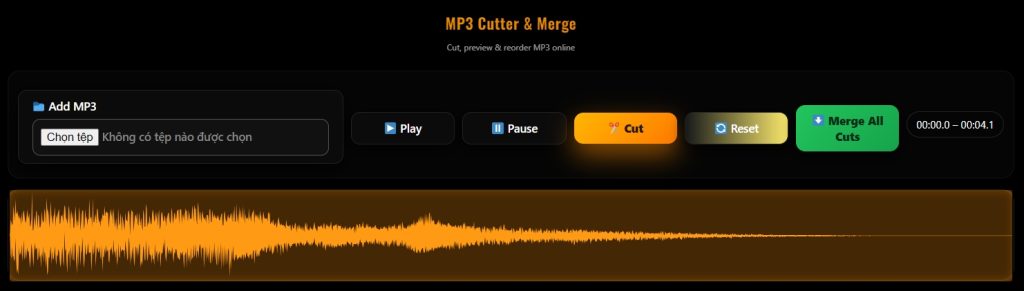
MP3 Cutter & Merge Online is a powerful browser-based tool that allows you to cut, preview, reorder, and merge MP3 files visually using an interactive waveform. No software installation, no account required — everything runs directly in your browser.
Designed with a modern Dark Orange UI, this tool focuses on speed, simplicity, and precision.
✂ Visual MP3 Cutting with Waveform
Unlike traditional audio editors, MP3 Cutter & Merge provides a clear waveform display so you can:
-
Select exact start and end points
-
Drag and resize cutting regions
-
Preview audio segments before saving
This makes cutting MP3 files accurate and intuitive, even for beginners.
🔀 Merge Multiple MP3 Segments
You can cut multiple parts from a single MP3 file and:
-
Save each cut as a separate segment
-
Reorder segments using drag & drop
-
Merge all selected cuts into one MP3 file
Perfect for creating ringtones, podcasts, voice compilations, or music edits.
⚡ Fast & Secure – 100% Client-Side
-
Audio files are processed locally in your browser
-
No file uploads to any server
-
Your MP3 files never leave your device
-
Instant processing with no waiting time
This ensures maximum privacy and security.
🎨 Modern Dark Orange Interface
The interface is designed for both aesthetics and usability:
-
Dark theme for reduced eye strain
-
Orange-highlighted cutting regions
-
Clear controls for play, pause, cut, reset, and merge
-
Fully responsive layout for desktop and mobile
🧩 How to Use MP3 Cutter & Merge
-
Click Add MP3 to upload your audio file
-
View the waveform and select the desired segment
-
Press Cut to save the segment
-
Repeat to create multiple cuts
-
Reorder segments if needed
-
Click Merge All Cuts to download the final MP3
📱 Cross-Platform Support
-
Works on Windows, macOS, Linux
-
Compatible with Chrome, Edge, Firefox, Safari
-
Mobile and tablet friendly
-
No registration required
🎯 Ideal For
-
MP3 ringtone creation
-
Podcast and audio editing
-
YouTube & TikTok audio trimming
-
Students and educators
-
Anyone who needs quick MP3 editing online
🔒 Privacy First
-
No tracking
-
No watermarks
-
No upload limits
-
No data storage
Your files remain private at all times.
✅ Why Choose This MP3 Cutter?
-
Visual waveform editing
-
Multiple cuts and merging support
-
Clean, modern UI
-
Fast performance
-
Completely free to use