Metric Engine Pro – Professional Area Measurement & Geometric Analysis Tool
Introduction to Metric Engine Pro V2.8
Metric Engine Pro V2.8 (Acreage Engine Pro) is a powerful browser-based geometric measurement and area calculation software designed for professionals who require high precision, visual clarity, and real-world scale accuracy.
The tool allows users to measure land areas, architectural spaces, construction layouts, and custom polygonal shapes directly on an interactive canvas, with real-time metric feedback.
Unlike traditional CAD or GIS software that requires heavy installation and steep learning curves, Metric Engine Pro runs smoothly in modern web browsers while still delivering professional-grade results.
Who Is Metric Engine Pro For?
Metric Engine Pro V2.8 is built for:
-
Land surveyors and real estate professionals
-
Architects and interior designers
-
Civil engineers and construction planners
-
Urban planners and landscape designers
-
Technical illustrators and educators
-
Anyone who needs accurate area calculation from visual references
Whether you are estimating land size, validating architectural dimensions, or analyzing geometric layouts, this tool provides a fast and reliable workflow.
Key Features of Metric Engine Pro V2.8
1. Real-World Area Calculation (m²)
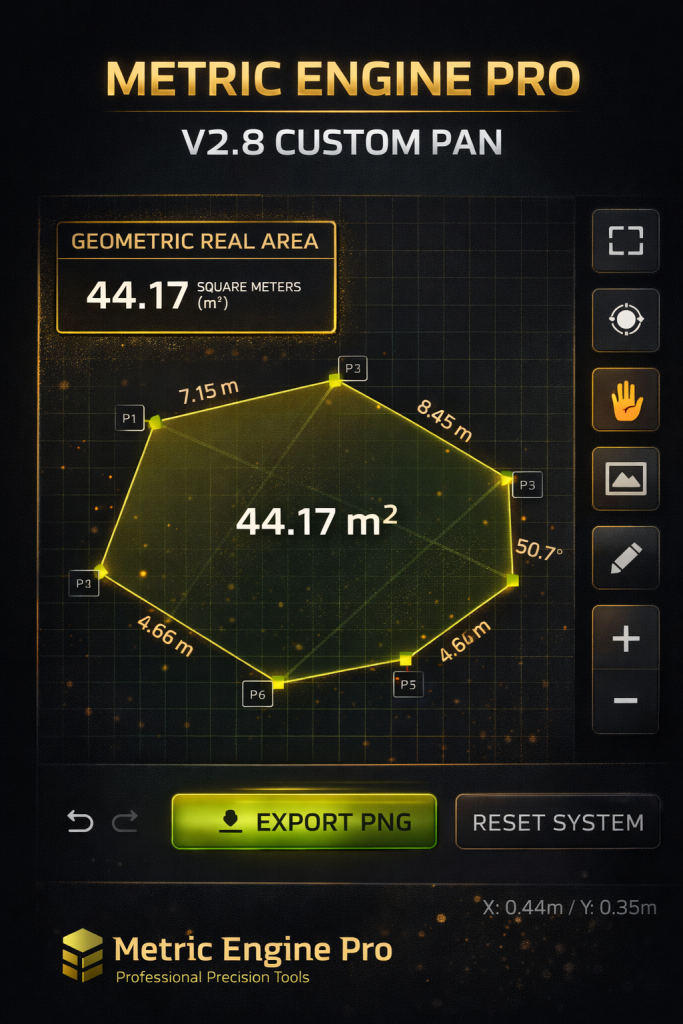
The core strength of Metric Engine Pro lies in its Geometric Real Area Engine.
By defining points on the canvas, the system automatically calculates:
-
Polygon area in square meters (m²)
-
Edge lengths between points
-
Internal angles for each vertex
The area value is displayed clearly both in the control panel and directly inside the shape on the canvas, ensuring immediate visual confirmation.
2. Precision Point-Based Drawing System
Users can draw any custom shape using a point-to-point polygon system:
-
Add points freely
-
Drag and reposition points dynamically
-
Insert points directly on edges
-
Delete points instantly
-
Undo / Redo full edit history
This gives complete control over geometry, suitable for irregular land plots and complex architectural outlines.
3. System Calibration for Real-Scale Accuracy
Metric Engine Pro includes a System Calibration module that allows users to convert visual distances into real-world measurements.
How it works:
-
Draw two reference points
-
Enter the real-world distance between them (meters)
-
The system recalibrates the entire canvas
Once calibrated, all measurements become physically accurate, making the tool suitable for professional estimation and documentation.
4. Reference Image Overlay Support
Users can upload any image as a background overlay, such as:
-
Satellite images
-
Site photos
-
Floor plans
-
Blueprint scans
-
Hand-drawn sketches
The overlay image can be:
-
Moved independently
-
Scaled visually
-
Adjusted without affecting geometry data
This makes Metric Engine Pro ideal for tracing and measuring from real-world visual sources.
5. Edge Length & Angle Analysis
Every edge and vertex is automatically analyzed in real time:
-
Edge lengths are displayed in meters
-
Angles are calculated in degrees
-
Data is synchronized between canvas and side panel
-
Metric tables update instantly with each adjustment
This is especially useful for engineering validation, architectural planning, and geometric verification.
6. Advanced Viewport Control
The software provides professional viewport handling:
-
Smooth zoom (mouse wheel)
-
Pan mode for canvas navigation
-
Independent background image movement
-
Reset view to default
-
Fullscreen working mode
These features allow users to focus on details without losing spatial context.
7. High-Quality PNG Export
Metric Engine Pro allows instant export of the canvas as a high-resolution PNG image:
-
Preserves visual clarity
-
Suitable for reports and presentations
-
Easy sharing with clients or teams
-
Timestamped export naming
This feature is essential for documentation, proposals, and technical communication.
8. Clean Professional Interface
The interface is designed with a dark professional theme, optimized for long working sessions:
-
Minimal distractions
-
Clear typography
-
Consistent color accents
-
Professional HUD and overlays
The layout adapts well to both desktop and large displays, making it suitable for office and field use.
Technical Advantages
-
Runs entirely in the browser (no installation)
-
No external dependencies required
-
High performance canvas rendering
-
Responsive layout
-
Secure, client-side processing
-
Easily embeddable into WordPress or internal systems
Why Choose Metric Engine Pro?
Metric Engine Pro V2.8 stands out because it combines:
-
Professional measurement accuracy
-
Visual simplicity
-
Fast workflow
-
Low technical barrier
-
Real-world usability
It bridges the gap between simple online calculators and heavy professional CAD software.
Conclusion
If you are looking for a powerful yet lightweight area measurement and geometric analysis tool, Metric Engine Pro V2.8 is an excellent solution.
Its precision, flexibility, and clean interface make it suitable for both professionals and advanced users who demand accuracy without complexity.
Metric Engine Pro is not just a drawing tool — it is a professional measurement engine built for real-world results.